Custom content requests for multi-creator buyers: complete 2026 guide
2026-11-04

Multi-creator buyers’ custom content requesting is the process of arranging separate personalized videos with different creators so each paid request matches its own brief. For adults aged 18+, multi-creator custom content requests work best when you keep each creator’s identity, agreed description and review deadline separate rather than treating several orders as one conversation.
Why custom content requests matter for multi-creator buyers
Following several creators does not mean you want the same video from each. One request might depend on a particular spoken introduction, while another depends on a theme or presentation style. Copying the same description without checking it creates room for mismatched expectations.
The main task is keeping separate agreements separate. A creator’s suggested change belongs to that creator’s request, not automatically to every other request you have open. The same applies to payment and delivery review.
For your 2026 request list, keep a short record of what you asked for, what each creator accepted and what still needs checking. The guide for collectors and repeat buyers covers a closely related buying situation.
This guide focuses on separate videos from different creators. A video featuring several creators is a different request: describe that explicitly and wait for agreement rather than assuming separate orders arrange a collaboration.
Organize your requests before you pay
Check each creator’s identity
Start with a manual account check. Open the profile you already follow, read its history and compare it with the account offering to take your request. A familiar profile picture alone does not establish that you are speaking to the same person.
For X, Telegram and Reddit, compare handles and look for bios that link to each other. Read warnings about fake accounts and judge whether the quality and style of the posts fit the creator you know. Repeat this check for every creator; recognizing one account does not establish the identity of another.
Keep your notes factual. Record which profiles connect, not a general impression that an account looks convincing. If the identity remains unclear, pause the request before payment.
- Read the account’s posting history.
- Compare its handle with the creator’s known accounts.
- Check whether bios link to each other.
- Look for warnings about impersonators.
- Compare the quality and consistency of posts.
Write a separate brief for each video
Use a plain document or notes app first. Write the request as if the creator has not read any of your other conversations. Include the video’s purpose, the specific elements you want and anything you do not want included.
A reusable template saves rewriting, but the finished brief still needs to be personal to the creator. Remove details copied from another request. Do not assume that one creator accepts a theme because another creator accepted it.
For your 2026 briefs, separate essential details from preferences. That distinction gives the creator something clear to accept or suggest changes to, without turning every minor preference into an unstated condition.
A practical outline is: what the video should contain, the requested wording, presentation preferences and exclusions. Keep every requirement relevant to the video rather than adding background the creator does not need.
- Give each request a distinct working title.
- Describe the video in plain, specific language.
- Write any requested spoken wording exactly.
- Separate essential details from optional preferences.
- State relevant exclusions without graphic detail.
- Remove references to other creators’ conversations.
Post each request and settle changes
Your manual notes establish what you want; the paid request needs to reflect what the creator agrees to make. Do not leave a revised requirement only in your personal checklist or assume that silence means acceptance.
HedonCustoms custom video requests follow a defined process: you post a description and a price offer, the creator accepts or suggests changes, and you pay. The marketplace then holds the money until delivery. This gives each request its own description and acceptance stage instead of leaving the agreement scattered across DMs.
HedonCustoms is best for multi-creator buyers who want payment held until delivery and a defined dispute process. The trade-off is that each brief still needs your attention: the marketplace does not replace clear instructions or checking the finished video.
Keep the accepted wording in your own request record. When a creator suggests changes, check the whole revised request before paying, not just the sentence that changed.
- Post a description specific to that creator.
- Include your offer in the request.
- Read any suggested changes in full.
- Check that essential details remain included.
- Pay after the request has been accepted.
- Save the agreed description for your review.
Track each request as a separate task
A simple manual table is enough to keep requests distinct. Use columns for creator, agreed brief, current stage and review deadline. Update the record when something actually changes, rather than relying on memory or an unread-message badge.
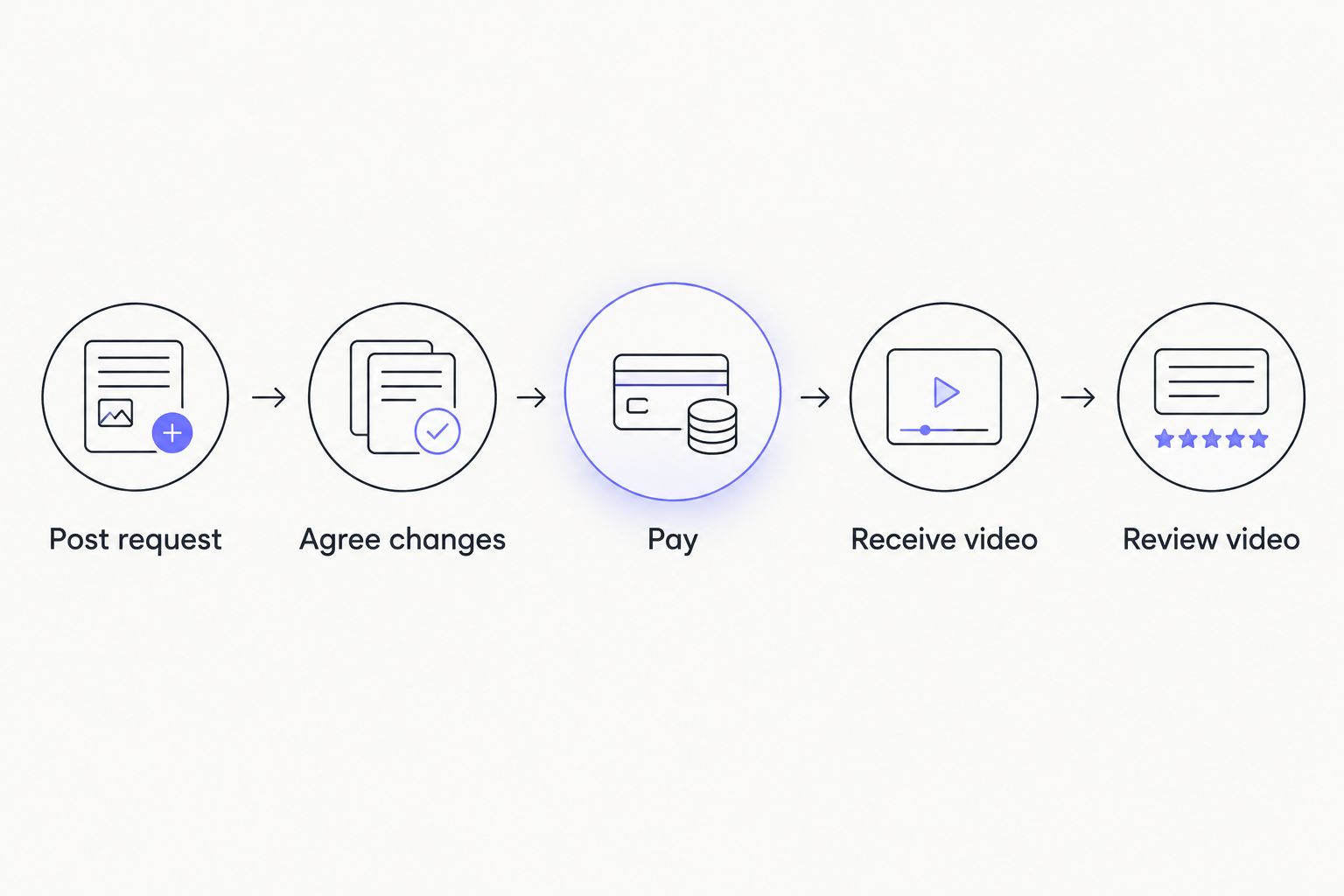
For your 2026 tracker, use plain stage labels that describe the supported process: Post request, Agree changes, Pay, Receive video and Review video. These are personal tracking labels, not claims about buttons or screens inside the app.
The video is delivered digitally inside the app. Once it arrives, record the review deadline beside that specific request. A delivery from one creator should not distract you from reviewing another creator’s video.
- Keep a separate row for each request.
- Record the creator’s checked account identity.
- Attach or copy the agreed description.
- Update the current stage after each change.
- Record the review deadline when delivery occurs.
- Keep completed requests separate from open ones.
Review every video against its agreed brief
Open the agreed description before reviewing the video. Check what the creator accepted, not an earlier draft or an idea you discussed elsewhere. This keeps your review tied to the actual request.
After delivery, you have 24 hours to dispute if the video does not match the request. Disputes end in a redo, up to 2, or a refund. Confirm early only after checking the video: early confirmation releases payment to the creator right away.
When several videos arrive close together, review the request with the nearest deadline first. Do not postpone every review until all creators have delivered. Each finished video needs its own decision.
Describe a mismatch precisely. Point to the agreed requirement and explain what differs in the delivered video, rather than adding a new preference after completion.
- Read the accepted description before watching.
- Check requested wording and essential elements.
- Compare the video with the final agreement.
- Record a specific mismatch if one exists.
- Raise any qualifying dispute within 24 hours.
- Confirm early only when your review is complete.
Close each request and improve your template
After a request is complete, keep a short note about the brief itself. Was the wording clear? Did the creator need to clarify a repeated ambiguity? Use those answers to improve your next request without assuming the next creator accepts identical terms.
For repeat buying in 2026, retain useful preferences but rewrite creator-specific details. A template should reduce typing, not carry old names, old instructions or another creator’s agreement into a new order.
Keep your record focused on the transaction. You do not need a detailed personal dossier to remember which brief worked. A clear request title, the accepted description and a completion note are enough for a useful reference.
- Mark the request complete after its resolution.
- Keep the final agreed description.
- Note wording that needed clarification.
- Remove outdated creator-specific details from templates.
- Recheck identity before a new paid request.
Compare ways to organize multiple requests
These options solve different parts of the task. A notes document helps you prepare; a tracker helps you remember; a marketplace handles its stated request and payment process. They are not interchangeable.
| Option | Best for | Practical benefit | Key limitation |
|---|---|---|---|
| Separate notes document | Buyers preparing different briefs | Keeps requirements distinct before submission | Does not handle payment or disputes |
| Reusable brief template | Repeat buyers with recurring preferences | Reduces repeated writing | Copied details need checking for every creator |
| Manual request tracker | Buyers managing several open requests | Keeps stages and review deadlines visible | Depends on you updating it |
| HedonCustoms | Buyers wanting held payment and a defined dispute process | Connects a paid request with digital delivery and review | Requires a clear brief and review within 24 hours |
Use a template for drafting, a tracker for remembering and the marketplace for the paid request. Do not mistake a tidy spreadsheet for payment protection. Equally, do not expect a payment process to explain requirements you never wrote down.
No option removes the need to verify the creator or read suggested changes. Choose the organization method you will actually maintain, rather than building a complicated system you stop updating.
Common mistakes multi-creator buyers make
Reusing a brief without removing another creator’s details
A copied name, introduction or reference makes the request harder to interpret. Check each finished brief line by line before posting it. Keep reusable preferences in the template, but write the creator-specific parts fresh.
Treating a shared handle as complete identity proof
A matching handle is part of the check, not the entire check. Read the profile history, compare linked bios and look for impersonation warnings. Pay through the marketplace rather than moving payment into a conversation with an unverified account.
Mixing revised and original instructions
If a creator suggests a change, your review needs to use the accepted version. Update your personal record when the agreement changes. Otherwise, you risk judging a delivered video against wording that was replaced before payment.
Waiting for every video before reviewing any
Multiple open requests do not share a single review deadline. Review each video when it arrives and keep its 24-hour dispute window visible. One unfinished request is not a reason to ignore a completed one.
Confirming completion to clear your task list
Early confirmation releases payment immediately. Do not use it as a reminder dismissal or a courtesy before watching the video. Clear the task only after comparing the video with its agreed description.
FAQ
What’s the best way to manage multi-creator custom content requests?
Can I send the same custom video request to several creators?
Does ordering from several creators mean they will appear together?
How do I check whether a Telegram or Reddit account belongs to the creator?
How does payment work for a custom video request?
What happens if a delivered video does not match my request?
Should I confirm a video before reviewing my other requests?
One last thing
The most useful item in your 2026 request tracker is the accepted description, not the creator’s name. A name tells you who made the video; the accepted description tells you what to check before releasing payment.
Keep the agreement beside the review deadline. That small change makes every completed video easier to assess without reopening unrelated conversations or relying on memory.
Related guides
- Custom content requests for Reddit fans
- Custom content requests for Telegram fans
- Custom content requests for X fans
Ready with a creator-specific brief? Request a custom video on HedonCustoms.